
Two separate sequences
Review loading and unloading in their own views.
See where products will sit in a truck, van or container, and in which order they load, before dispatch. Orders, pallets, vehicles and delivery sequence stay in the same 3D plan.
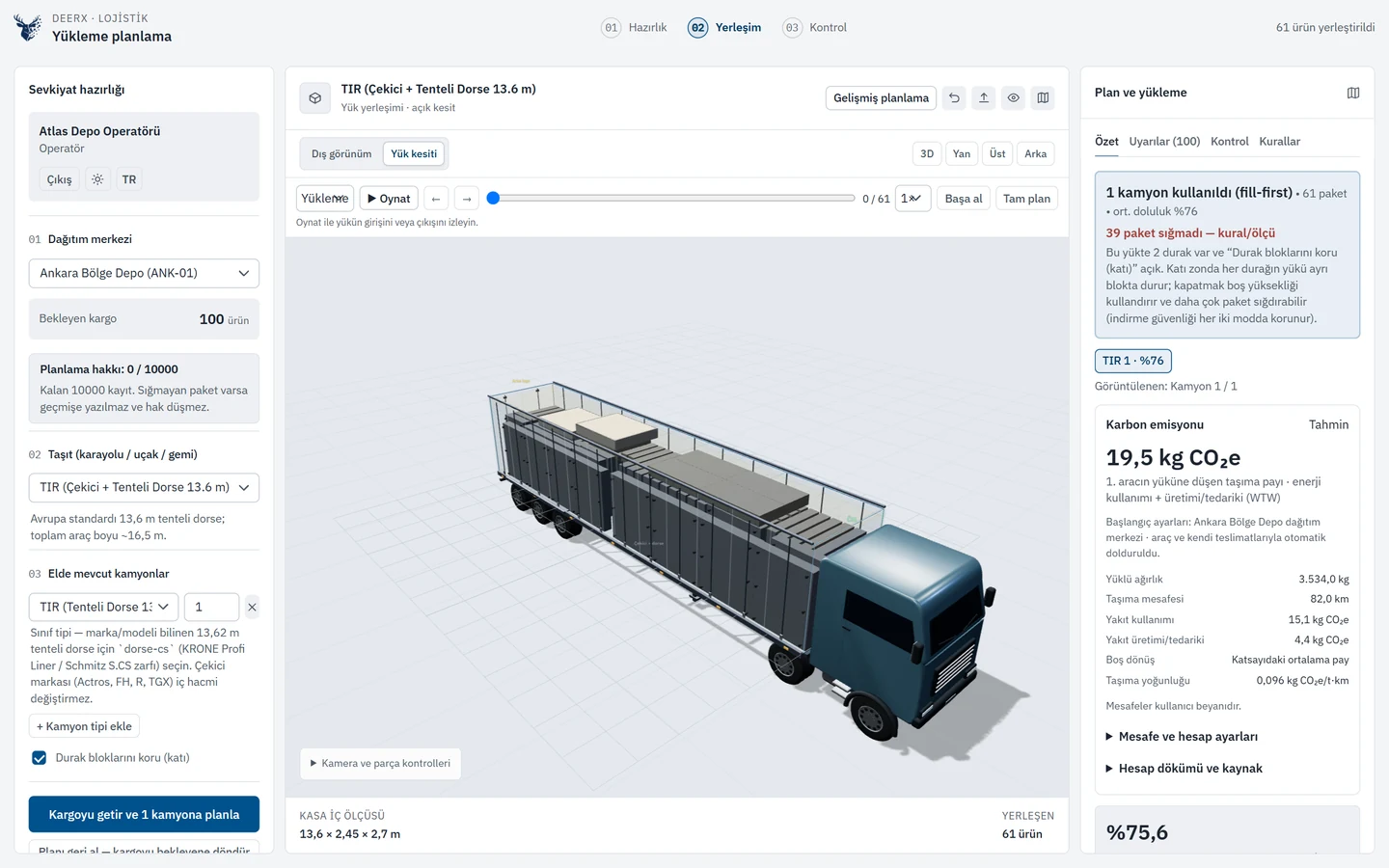
Product requirements, load-space dimensions and capacity are evaluated together.
Play, pause and inspect loading and unloading sequences.
Share an expiring plan link and separate loading and unloading documents.
DeerX considers product shape, weight, permitted orientation, physical support and delivery order in each placement decision. Fragility and stacking declarations are also checked during manual adjustments.
Define the usable space of a truck, van or container. Plan palletized and mixed loads; review the cargo per vehicle, unplaced orders and warnings while preparing a dispatch.
Use play, pause, speed and step controls for loading and unloading. Follow the selected product as it moves from outside the vehicle to its position, or out of the vehicle, in 3D.
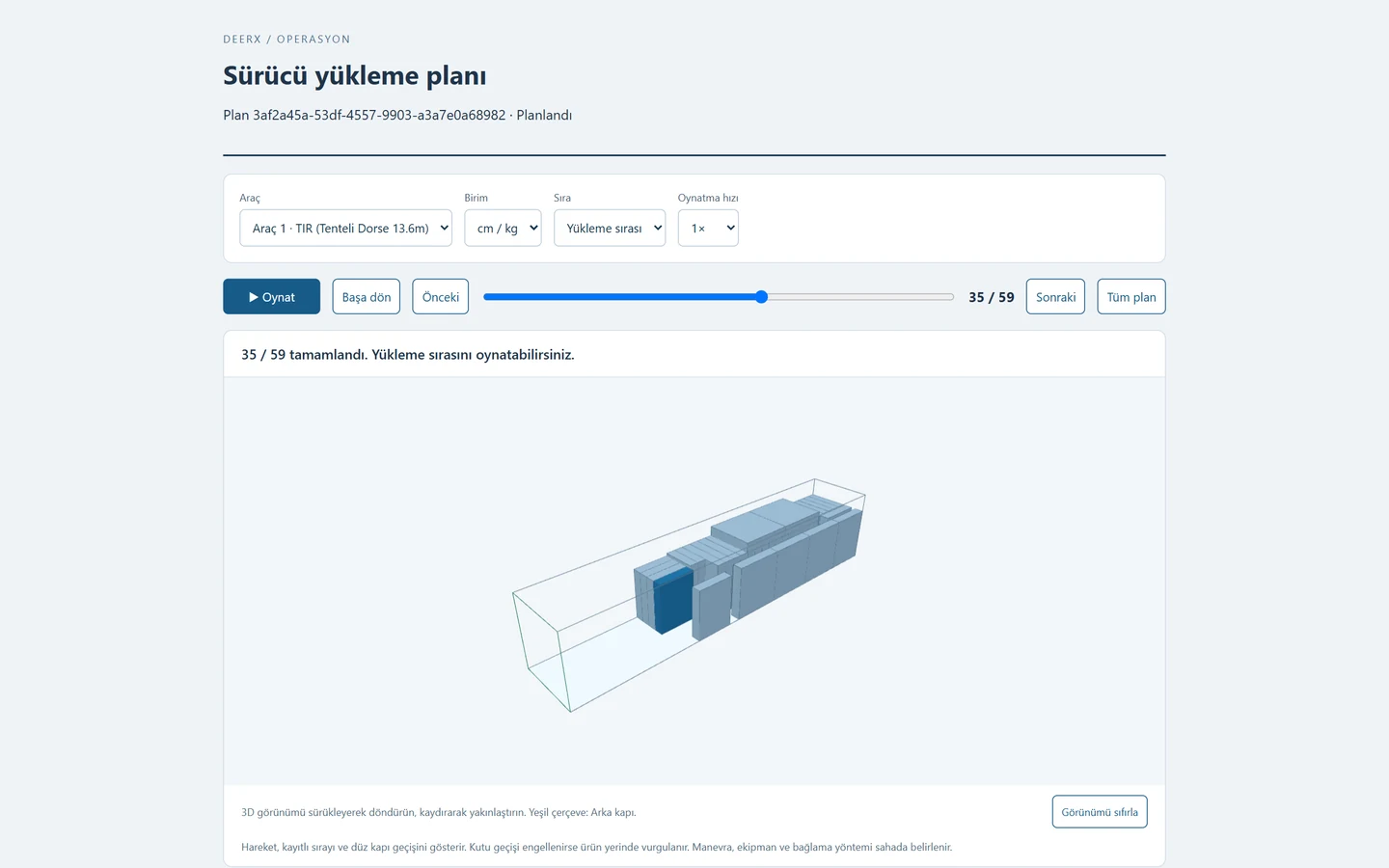
Review loading and unloading in their own views.
Recipients of an expiring link can rotate and zoom the plan without creating an account.
Create separate loading and unloading documents; save them as PDF from the browser print dialog.
The animation shows the straight passage that the plan can validate. Forklift and gripper movements are not modeled.
Fragility, declared top-load capacity, stack count and height are evaluated together. Permitted orientations and which products may support other products are checked.
Palletize products and place the resulting load units into vehicles. Contents, identities, pallet tare and total weight are preserved. Column, 90° and alternating-layer patterns are available.
Include fixed obstacles such as wheel arches and refrigeration units. Define a rear, front, left, right or top entry face and its opening dimensions for the plan.
Compare vehicle types and trip prices. Evaluate complete-kit loading with a SKU/quantity recipe or choose from available cartons; review what remains unplaced.
Keep selected placements in their positions and replan the remaining cargo for that vehicle. Manual moves and rotations go through the same placement validation.
Search, filter and sort saved plans. Link a plan to the dispatch calendar; set daily or weekly repeats within a date range and export an ICS file.
Import order and product data through REST APIs, Excel, CSV and JSON. Select cm, mm or inches and kg or pounds for material, load-space and file inputs. Map ERP fields to your workflow.
Review kg CO₂e for each vehicle’s cargo and deliveries. Use regional references, actual consumption or carrier data; obtain road distances automatically when Google Maps is configured.
Verify product dimensions, weights and stacking declarations. Import orders from your ERP or a file; choose a warehouse and the vehicles to use.
Inspect 3D placements, pallet contents, capacity and warnings. Play the loading and unloading sequences and fix placements that need to stay.
Save the plan and create an expiring driver link. Share separate loading and unloading documents and add the dispatch to the calendar.
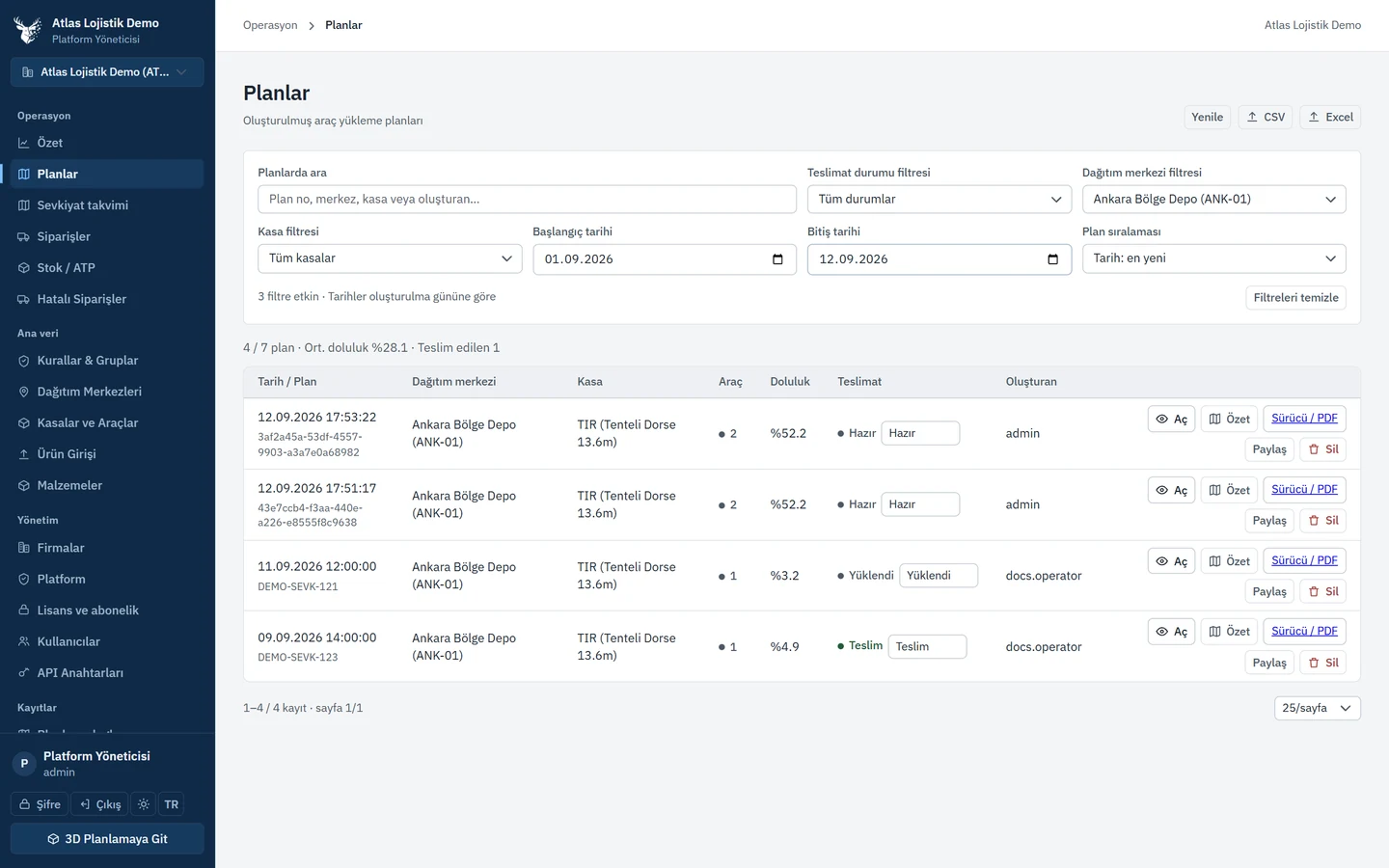
Use search, filters and sorting in the plan archive to focus on the relevant dispatch.
Enlarge screen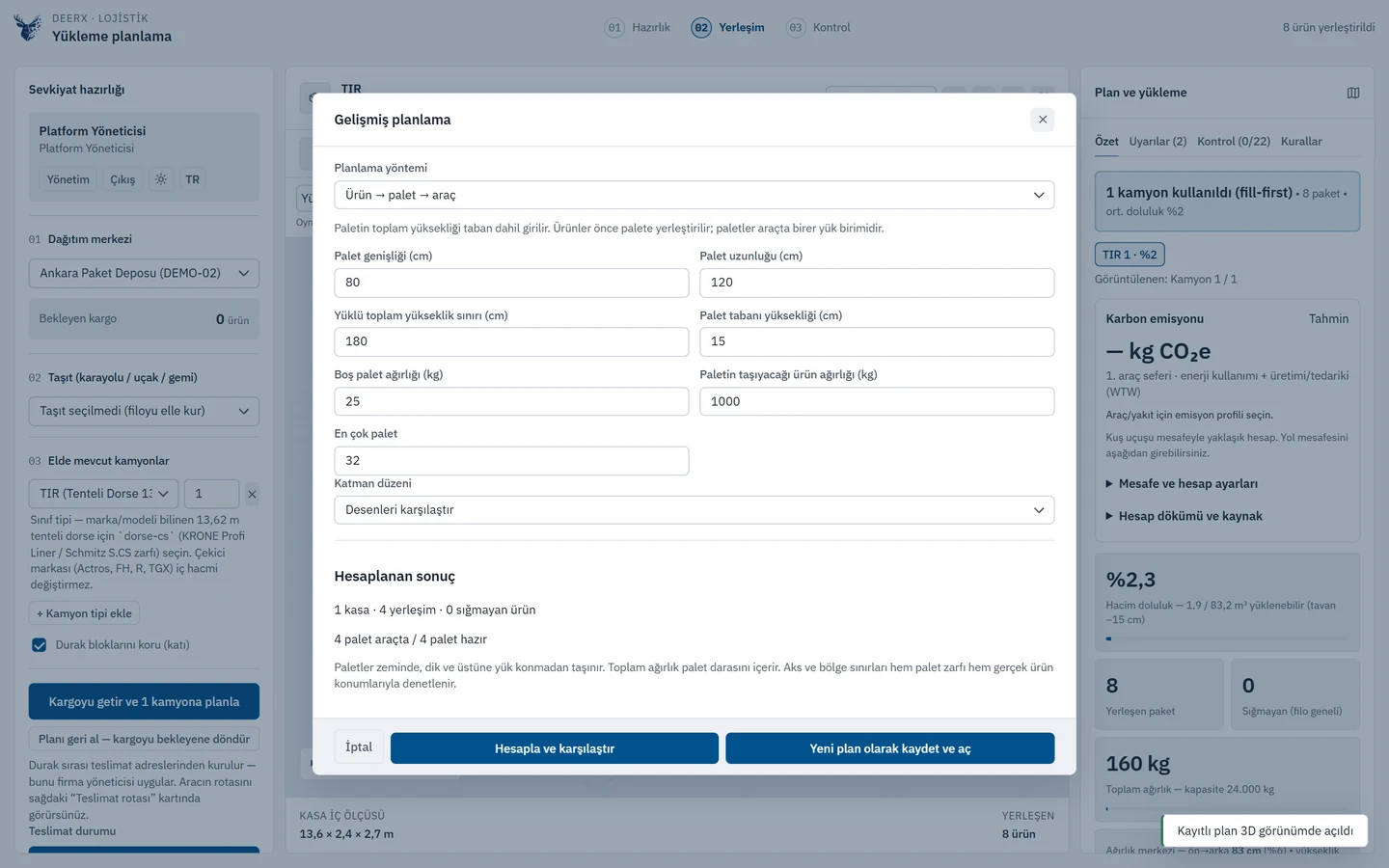
Use palletizing, fleet cost, fixed placements, kit recipes and carton selection to suit the operation.
Enlarge screen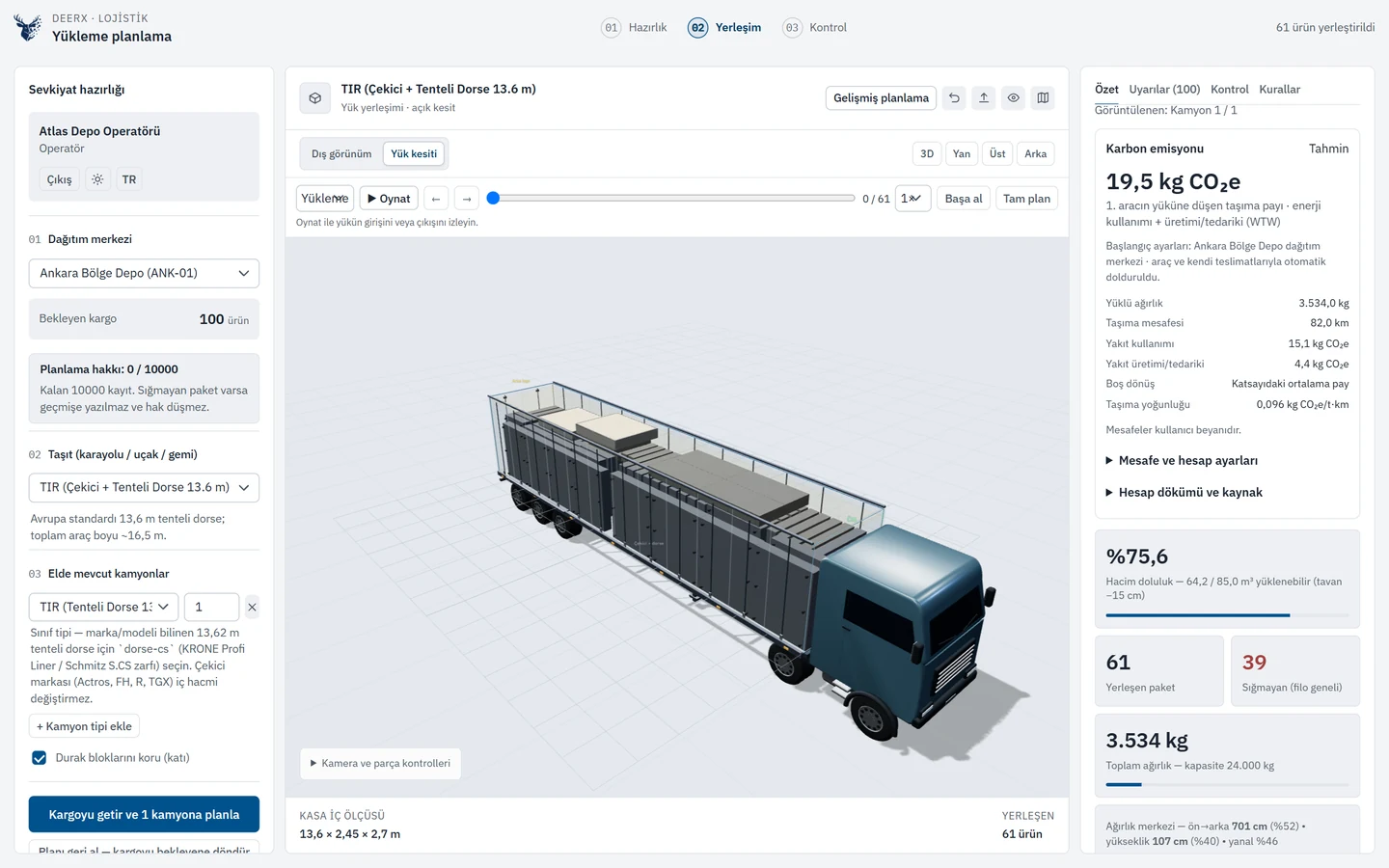
Review the selected vehicle’s load, distance and carbon calculation in the same workspace. The calculation shown uses sample data.
Enlarge screenEach company works with its own products, orders, models and plans. Company administrators manage their teams; operators plan cargo for their assigned warehouses.
Access to records and actions follows your role.
Master administrator control of packages, periods, allowances and renewals.
Your quotation defines the scope and support.
DeerX produces a 3D load plan from orders to pallets and vehicles. Placement, loading and unloading sequence, a shareable plan and PDF/CSV output for trucks, vans and containers are in the package.
Yes. Usable cargo space, palletised and mixed loads, orders that do not fit a vehicle and warnings sit in dispatch preparation. Palletizing lives on the same plan.
Yes. The driver plan has separate loading and unloading document outputs. Choose Save as PDF in the browser print dialog. Separate CSV outputs are also available.
Yes. Recipients of an expiring link can rotate and zoom the 3D plan and play loading and unloading step by step without creating an account. The animation shows straight entry and exit passages; forklift maneuvers are not simulated.
The master administrator directly sets each company's package, access period and planning allowance. Company administrators can view their subscription and usage; no license file needs to be generated or uploaded. Renewals, suspension and resumption are managed on the same screen. Commercial scope and support are defined in the quotation and customer agreement.
The calculation follows GLEC 3.2 and ISO 14083 transport-accounting principles. It supports regional and international references, documented consumption and carrier data. Missing values are not treated as zero. Results cover the planned transport legs and do not constitute ISO certification or a full supply-chain inventory.
Alongside furniture, mattresses, office and hospitality products, other goods can be planned when their dimensions and handling characteristics are defined. Packaging, orientation and stacking declarations are evaluated for each product.
REST APIs support order and master-data integration. Excel, CSV and JSON imports are also supported. Field mapping, permissions and data flows are agreed around your existing ERP workflow.
Sample orders, vehicle internal dimensions and capacity, product dimensions, weights and verified handling and stacking data. The pilot evaluates vehicle use, loading time and how well the plan works on site.
DeerX supports loading decisions. Final dispatch must also account for actual product and packaging data, load-securing requirements and on-site operational checks.
Tell us about your products, vehicles and warehouse workflow. We can review the 3D plan, loading sequence and team documents around a sample order.